For those in need of transcribing audio to text, Whisper is one of the most powerful free tools at your disposal. The tool can be accessed via your command line, but if you prefer or require to have its output divided into subtitle lines you can download Subtitle Edit and use Whisper from inside the software.

Subtitle Edit is a free and open-source software widely used for creating, editing, and synchronising subtitles for videos. It is currently available for Microsoft Windows.
Here is the official website: https://www.nikse.dk/subtitleedit
After you download it, go to Video – Audio to text (Whisper). You will be told to download FFmpeg, which is an open-source multimedia framework that allows the recording, conversion, and streaming of audio and video in numerous formats. Please do so.
After a brief download, a new window like the following will pop up.
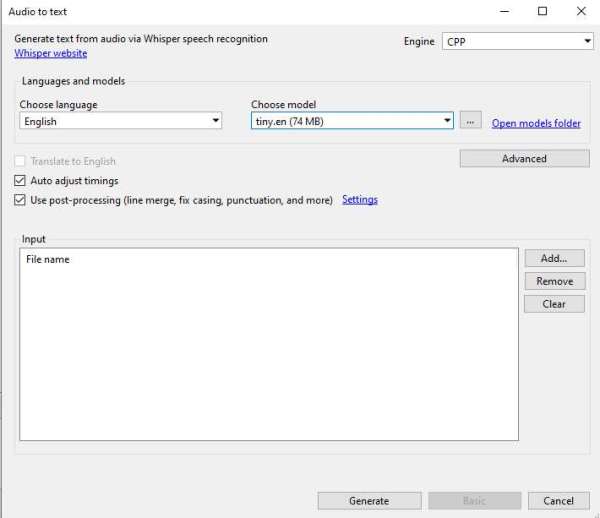
You will be asked to choose 3 things:
1. The engine (OpenAI, Purfview’s Faster Whisper, CPP, CPP cuBLAS, Const-me, CTranslate2, stable-ts, WhisperX). You will need to download each model separately (Faster Whisper, CPP, CPP cuBLAS and Const-me) or locate an EXE file inside your system (in the case of WhisperX, OpenAI, CTranslate2 and stable-ts).
The OpenAI model is slow but accurate, CPP is an improved version of OpenAI’s, Faster Whisper generates transcriptions faster and with less VRAM requirements, and Const-me uses your GPU to provide faster transcriptions.
2. The language of the audio that requires transcription. Can only choose one at a time.
3. The model that you want to use (different sizes such as tiny, base, small, medium and large). You may require additional downloads here. You can download the version of the model that you think might better suit your needs and experiment with different engines and models. In general, the bigger the model, the more VRAM required.
Finally, click on generate and wait for the process to finish.
Caveat: if the clip you are aiming to transcribe is multilingual, results will not be optimal. Choose the language that is most present, knowing that the recognition will not work properly for the rest of languages. Then, you may rerun selecting other languages.
Of course, the output will probably be far from perfect, and may require further proofreading and formatting.
If you want to know more about Whisper, please check this repo: https://github.com/openai/whisper
 Luis Damián Moreno García (PhD, FHEA)